


Numberries for Wildberries
No extension
Shelf cell number printing for Wildberries pickup points
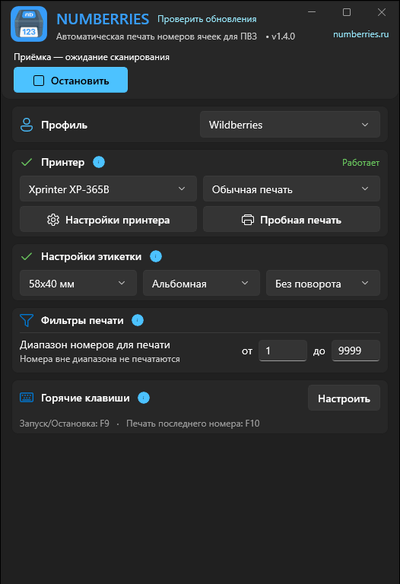
Open WB Point on your pickup point computer and choose the Wildberries (WB) profile in Numberries — the cell number prints the same second you receive an order.
70–300 ms
print time on a mid-range computer and printer
Setup
Three steps to automatic printing
-
Install Numberries
Download the app for Windows 10 or 11 — all components install automatically.
-
Choose the Wildberries profile
Choose the Wildberries profile in the main window. No extension needed.
-
Select “Запустить” (Start) and receive orders
Receive orders in WB Point as usual, and the label prints on its own. When the app starts with Windows, you don’t need the button: work starts automatically.
What you’ll need
- A computer with Windows 10 or 11
- WB Point open on the same computer (not through Remote Desktop)
- Any printer that can print from Windows; check that your model works during the free trial
FAQ
Do I need a browser extension?
No. For Wildberries, just choose the profile in the main window — you don’t need an extension or a screen area. The Numberries Bridge extension is needed only for Ozon and Yandex Market.
When does the label print?
When you receive an item in WB Point: each scan prints one label with the cell number. Scanning again on the “Приёмка” (Receiving) tab prints the label once more — handy when a customer has several items in one cell or you need to reprint an item received long ago. No label prints during handover, item search or returns.
Will the profile work if WB Point is opened through a remote desktop?
No: WB Point and Numberries must run on the same computer. If WB Point is opened through RDP or AnyDesk, choose the “Своя область” (Custom area) profile.
How much does Numberries cost?
290 ₽ per month or 2,900 ₽ per year — 2 months free. The first 14 days are free, no credit card required. One license works on one computer with all profiles. All plans
Start now
Start using Numberries today
Try every feature free for 14 days. No credit card, no hidden fees.
- No credit card required
- 14 days free