


“Своя область” (Custom area) mode
Other systems
Shelf cell number printing for other pickup point systems
CDEK, Avito and other pickup point systems work through the “Своя область” (Custom area) mode, if the cell number appears on screen in digits. Select the screen area with the number, and the app prints the label.
1–9999
cell numbers made of digits, including numbers with a hyphen
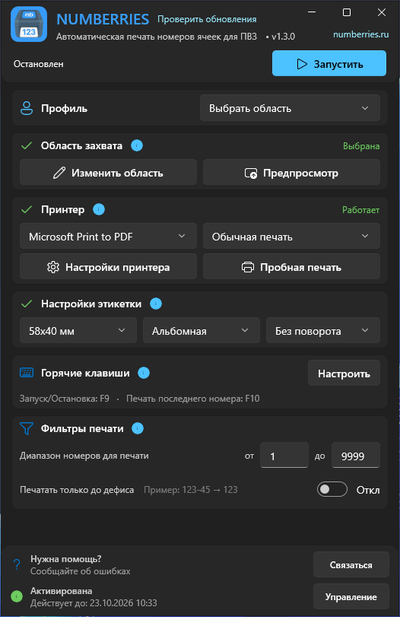
Setup
Three steps to automatic printing
-
Choose the “Своя область” profile
In the app, it’s called “Выбрать область” (Select area). It works with pickup point apps and websites that show the cell number on screen in digits.
-
Select the area with your mouse
Mark the spot where the number appears. The app remembers the area for the next time you start it.
-
Select “Запустить” (Start)
When a new number appears in the area, the label prints automatically.
Good to know
- The cell number appears on screen in digits
- You can change the area at any time
FAQ
Which systems does “Своя область” work with?
CDEK, Avito and other pickup point systems work through the “Своя область” mode, if the cell number appears on screen in digits. The mode also helps when the pickup point app runs on another computer through a remote desktop (RDP, AnyDesk) and its window is visible on your screen.
How do I set up “Своя область”?
Choose the “Своя область” profile (called “Выбрать область” (Select area) in the app), select the spot where the cell number appears with your mouse once, and click “Запустить” (Start). When a new number appears in the selected area, the label prints on its own — usually in about half a second.
Which numbers work?
Numbers made of digits from 1 to 9999 and numbers with a hyphen, such as “123-2”, work. Numbers with leading zeros (“007”), five-digit numbers and cells with letters (“КГТ-12-1”) don’t.
What if the pickup point app window moves?
Numberries remembers a spot on the screen, not a window. If the window moves, changes size or the page zoom changes, select the area again with the “Изменить область” (Change area) button in the main window.
Why are dedicated profiles better for Wildberries, Ozon and Yandex Market?
These profiles are set up without selecting an area: window position and size don’t matter, and printing is faster. Compare profiles
How much does Numberries cost?
290 ₽ per month or 2,900 ₽ per year — 2 months free. The first 14 days are free, no credit card required. One license works on one computer with all profiles. All plans
Start now
Start using Numberries today
Try every feature free for 14 days. No credit card, no hidden fees.
- No credit card required
- 14 days free