


On this page
In short
- A 3-inch USB thermal printer with 203 dpi starts at 4,970 ₽ (Xprinter XP-365B, Регард, Sep 24, 2026). A 4-inch printer is for 100 mm wide labels, not for cell numbers.
- A 58×40 mm ECO label costs about 24 kopecks, and a 30×20 mm one about 6 kopecks (prices as of Sep 24, 2026). We didn’t collect prices for 40×30.
- A 58 mm label needs a printer that takes media 58 mm wide or more: the XP-237B, XP-243B and ATOL DD120 won’t take it. Check the media width in the specs, not just “2 or 3 inches.”
- In Numberries, “Быстрая печать” (Fast printing) works with printers that use the TSPL command language, and “Обычная печать” (Standard printing) works with any printer through the Windows driver.
- An A4 office printer is useful separately: for WB cell QR labels and Yandex Market handover certificates.
Do Wildberries, Ozon and Yandex Market pickup points need a printer?
Each marketplace has its own rules. WB’s opening checklist lists a scanner but not a printer. Yandex Market recommends an A4 laser office printer for handover certificates. We found no public printer requirements from Ozon, but Ozon Turbo (Турбо ПВЗ) sends container labels and replacement barcode labels to print. None of them explicitly requires a thermal label printer.
| Marketplace | What they say officially | Source |
|---|---|---|
| Wildberries | There’s no printer in the checklist for opening a pickup point on standard terms: it lists a scanner, the WB ПВЗ app (formerly WB Point) on a computer and an Android smartphone, cameras and bags. WB ПВЗ generates cell QR labels as a PDF — up to 33 per A4 sheet, printed on a regular printer. | WB checklist, version of Aug 25, 2026; WB ПВЗ channel, Sep 30, 2025 |
| Ozon | We found no public printer requirements. But a pickup point still has to print. Container and crate labels are printed with the printer button in Ozon Turbo. For some items with an unreadable barcode, a label comes from the “Показать этикетку” (Show label) button: “Print the label, cut it out and attach it neatly to the item.” No printer model or format is specified. | Ozon Универ ПВЗ: Feb 10, 2026, Jan 23, 2026 |
| Yandex Market | “The printer is used to print parcel handover certificates and notices.” The recommended models are the Pantum P2500W and HP LaserJet M111w, black-and-white A4 laser printers. A thermal printer isn’t mentioned. | Pickup point equipment, market.yandex.ru, checked Sep 24, 2026 |
A thermal printer is the owner’s choice, not a requirement. Owners buy one to speed up receiving and to avoid writing on items. On April 2, 2024, WB banned markers for any work with items, and on August 13, 2025, it stated plainly that writing the cell number on an item with a marker leads to a deduction for damaged goods. On January 22, 2026, Ozon asked staff to write the number on a sticky note, a price tag or masking tape rather than on the item. For details, see “Marker or label”.
Two printers at a pickup point: which does what
A pickup point can use two different printers: an A4 office printer for documents and shelf labels, and a thermal label printer for the cell number on each item. An Ozon pickup point also needs a printer for container labels and replacement barcode labels from Ozon Turbo; Ozon doesn’t specify the format. Seller barcode labels are printed by the seller.
| Task | Printer | Who needs it |
|---|---|---|
| Handover certificates and notices | A4 black-and-white laser office printer | Yandex Market pickup points, as the marketplace recommends |
| QR labels for cells | Any A4 printer: WB ПВЗ produces a PDF with up to 33 labels per sheet | WB pickup points that change cells with a scanner |
| Ozon container labels and replacement barcode labels | Ozon doesn’t specify the model or format. A label for an item with an unreadable barcode is printed, cut out and taped on | Ozon pickup points: the printer button next to a container and “Показать этикетку” (Show label) in Ozon Turbo |
| Cell number on items during receiving | A 2–3 inch thermal label printer and an app that prints the number | Anyone who doesn’t want to write on items with a marker |
| Seller barcode labels: 75×120, 100×150, 58×40 | 3–4 inch thermal printer | Sellers: they use them to label goods and shipments. Not needed for the cell number |
The 75×120, 100×150 and 58×40 mm sizes that printer sellers advertise “for WB and Ozon” are for seller labels. You don’t need them for the cell number.
Types of label printers
Label printers differ in printing method, width, connection, peeler and resolution. For cell numbers, the simplest setup is enough: direct thermal, 3 inches, USB, 203 dpi.
Direct thermal or thermal transfer
Direct thermal printing develops the image on thermal paper with heat, so no ink ribbon is needed. Thermal transfer prints through a ribbon: the print lasts, but you need supplies, and the printer costs more. For example, the TSC TE200 costs 16,880 ₽ (Регард, Sep 24, 2026).
For a pickup point: direct thermal. A parcel stays at a pickup point for days, not years.
Resolution: 203 or 300 dpi
203 dpi is 8 dots per millimeter. 300 dpi is for small barcodes and text.
For a pickup point: 203 dpi is enough for a large number; 300 dpi means overpaying.
Width: 2, 3 and 4 inches
2-inch printers print a 48–56 mm strip, and their media width varies: the XP-237B takes labels up to 48 mm, the XP-243B up to 56 mm, the MERTECH LP58 EVA up to 58 mm and the TSC TDP-225 up to 60 mm. 3-inch printers (72–82 mm print width) take every size used for numbers, including 58×40. 4-inch printers (108 mm) are for 100 mm wide labels, such as the 100×150 labels sellers use.
For a pickup point: 3 inches. For a 58 mm label, check the media width: it must be 58 mm or more.
Connection: USB, Bluetooth, LAN, Wi-Fi
USB is the simplest: the printer sits next to the computer, and the connection doesn’t drop. Bluetooth gets rid of the cable but takes longer to set up. LAN and Wi-Fi are for sharing one printer between several workstations.
For a pickup point: USB at every receiving station.
With or without a peeler
A printer with a peeler dispenses each label already peeled off its liner and doesn’t print the next one until you take the previous one. The XP-370B works this way.
For a pickup point: handy if you stick the label on right after scanning. With batch receiving, the peeler slows things down.
Which printer to choose for your pickup point
For cell numbers, one 3-inch printer at 5,000–8,500 ₽ per receiving station is usually enough. A model with a larger roll or a network connection makes sense at 300 or more items received a day and in pickup point networks.
These picks are based on specs and prices as of September 24, 2026. We haven’t tested these combinations with Numberries.
| Your pickup point | Printer | Label | What to keep in mind |
|---|---|---|---|
| Small, up to 100 items received a day | 3-inch with USB, such as the Xprinter XP-365B at 4,970 ₽ | 40×30 or 58×40, ECO | Keep 2–3 spare rolls, and calibrate the printer for each new batch of labels |
| Medium, 100–300 a day | XP-365B or XP-370B at 7,570 ₽ | 40×30 or 58×40 | The XP-370B peeler is handy for item-by-item receiving but can get in the way with batch receiving. Rolls up to 100 mm mean fewer roll changes |
| A pickup point network or 300+ a day | One that takes 100–127 mm rolls (XP-370B, or TSC TDP-225 if available) or a network model (ATOL DD230) | The same at every location | One model across the network, plus a spare printer. You need a Numberries license key for each computer |
| Several marketplaces at one pickup point | One per receiving station | The same ones | One printer and one type of label for all marketplaces. Numberries profiles work one at a time: switch the profile when you switch marketplaces |
| Bulky items | The same | The same: one size for all labels | Numberries prints Ozon bulky-item cells (КГТ) on one line, such as “КГТ-12-1”, if the “Печатать КГТ” (Print bulky items) toggle is on (requires Numberries 1.3.0 and Bridge 1.1.0 or later). The app has no separate larger size for bulky items |
| Box storage | The same, for labels on orders | 40×30 | Works if the marketplace’s system still assigns the cells. We haven’t tested Numberries with box storage. Make the range label for a box in any label editor or on an A4 sheet. More below |
| A Yandex Market pickup point | Plus an A4 laser office printer | — | For handover certificates, as Yandex Market recommends |
Thermal printers for cell numbers compared
3-inch thermal printers at about 5,000–8,500 ₽ are a good fit for cell numbers: Xprinter XP-365B, XP-370B, POScenter PC-365, ATOL DD230. The 2-inch XP-237B is cheaper but doesn’t take 58 mm labels. The 4-inch XP-420B isn’t needed for numbers: the extra width is wasted, and rolls go only up to 76 mm.
How we compared: specs come from manufacturers and store listings (linked from the model name); prices are retail prices in stores as of September 24, 2026. All models in the table have 203 dpi resolution. The table covers 3-inch models, plus 2- and 4-inch models for comparison. We don’t sell printers and haven’t tested these models.
| Model | Print / media width, mm | Speed, mm/s | Roll, mm | Peeler | Command language | Price as of Sep 24, 2026 |
|---|---|---|---|---|---|---|
| Xprinter XP-365B Direct thermal. The basic option for 40×30, 58×30 and 58×40. Works from +5 °C. The print head isn’t replaced under warranty. Large rolls don’t fit under the cover. | 76 / 20–80 | 127 | up to 80, core 25–40 | No | TSC, ESC/POS | 4,970 ₽ Регард, in stock 5,249 ₽ xprinters.ru, out of stock |
| Xprinter XP-370B Direct thermal. With a peeler: the next label comes out only after the previous one is removed. Handy for item-by-item receiving; can get in the way with batch receiving. Takes a larger roll than the XP-365B. | 82 / 20–82 | 152 | up to 100, core 25–40 | Yes | TSC, ESC/POS | 7,570 ₽ Регард, in stock 7,749 ₽ xprinters.ru, out of stock |
| Xprinter XP-420B Direct thermal. Not needed for cell numbers: extra width, and rolls only up to 76 mm. Makes sense if the location also prints 100 mm wide labels, such as 100×150. | 108 / 20–108 | 152 | up to 76 | No | TSPL, EPL, ZPL, DPL | 6,950 ₽ Регард, in stock 6,999 ₽ xprinters.ru |
| Xprinter XP-237B Direct thermal. 2-inch: only suitable for 30×20 and 40×30. | 48 / 20–48 | 101 | up to 76, core 25–40 | No | TSPL, ESC/POS | 3,349 ₽ xprinters.ru |
| TSC TDP-225 Direct thermal. Large roll, so fewer changes. Works from +5 to +40 °C; the print head warranty is 25 km or 12 months. Peeler, cutter and Bluetooth are dealer options. | 54 / 15–60 | up to 152 | up to 127, core 25.4–38 | Optional | TSPL | Регард: out of stock |
| POScenter PC-365 Thermal. Similar in specs to the XP-365B. | 76 | 127 | — | — | — | 5,900 ₽ Магазин 1С |
| ATOL DD230 Thermal. USB and Ethernet: one printer can be shared over the network by several workstations. | 72 | — | — | — | — | 8,500 ₽ Магазин 1С |
| MERTECH LP58 EVA Direct thermal. Print head life of 50 km, up to 7,000 labels a day and a 2-year warranty, according to the manufacturer. A Russian brand. | 56 / 25.4–58 | 76 | up to 90 | — | — | 12,580 ₽ mertech.ru |
- Width: the first number is the print width, the second is the supported label width. A 58 mm label needs media width of 58 mm or more. Sources disagree: for the XP-365B, the global Xprinter website gives media up to 82 mm; for the XP-370B, Регард gives a 76 mm print width. The table uses data from xprinters.ru.
- The model name links to the source of the specs: the manufacturer’s website or spec sheet, or a store listing.
- The command language matters for the “Быстрая печать” (Fast printing) mode in Numberries: it works with printers that understand TSPL, the command language of TSC printers (Xprinter listings call it “TSC”). A test print will show whether a particular printer works. “Обычная печать” (Standard printing) goes through the Windows driver and works with any printer, including Zebra.
- The XP-365B print head isn’t replaced under warranty, since it’s considered a consumable (xprinters.ru). The TSC TDP-225 print head warranty is 25 km or 12 months. For a pickup point network, keep a spare printer.
- Standard large rolls don’t fit under the XP-365B cover, according to buyers’ reviews on Отзовик.
Labels for the cell number: size, type and price
For the cell number, use 40×30 or 58×40 mm ECO thermal labels on a 40 mm core. A 58×40 mm ECO label costs about 24 kopecks, and a 30×20 mm one about 6 kopecks (prices as of Sep 24, 2026); per 1,000 items received, that’s 243 ₽ and 60 ₽. We didn’t collect prices for 40×30.
Size
- 30×20 mm
- 40×30 mm default
- 40×40 mm
- 58×40 mm
Numberries has presets for 30×20, 40×30 (default), 40×40 and 58×40 mm, and you can enter any other size in whole millimeters. Rectangular labels work better than square ones: at the same height, the number on a wide label is larger and visible from a distance. At the bottom of the label is the numberries.ru strip; there’s no barcode on it.
ECO, TOP or semi-gloss
- ECO — thermal paper without a protective coating. Inexpensive and meant for short-term storage, which is just right for a cell number.
- TOP — with a protective coating against moisture, grease and abrasion (label4u.ru). Worth it if items sit in a damp room for a long time.
- Semi-gloss — for thermal transfer printers with an ink ribbon. In a direct thermal printer, it comes out blank.
Core, winding and roll
The XP-365B and XP-370B take 25–40 mm cores and inside-wound rolls, so rolls on a 40 mm core fit. The outer roll diameter can be up to 80 mm for the XP-365B and up to 100 mm for the XP-370B. Stores usually don’t list it, so check the diameter against your printer before buying. By our estimate, the rolls of 700–2,000 labels in the table below are thicker than 80 mm, and XP-365B buyers on Отзовик recommend rolls of 250 labels.
Checking the thermal layer is easy: scratch the label with something sharp (Xprinter FAQ) or with a fingernail, and a black line should appear.
How much they cost
| Label | Roll price, store, date | Per label | Per 1,000 |
|---|---|---|---|
| 30×20 mm, ECO, 2,000 per roll | 120 ₽ on sale (regular price 150 ₽), Интер Ай Ди, Sep 24, 2026 | 0.06 ₽ | 60 ₽ |
| 58×30 mm, ECO, 900 per roll | 144 ₽ on sale (regular price 180 ₽), Интер Ай Ди, Sep 24, 2026 | 0.16 ₽ | 160 ₽ |
| 58×40 mm, ECO, 700 per roll | 170 ₽, Гофросклад, Sep 24, 2026 | 0.24 ₽ | 243 ₽ |
We didn’t collect prices for 40×30 labels. Sale prices may go up; we review them once a quarter. Example: at 100 items received a day (3,000 a month), labels cost 180–729 ₽ a month, depending on the size.
Computer for a pickup point: what you need to print numbers
Any ordinary computer with Windows 10 (version 2004 or later) or Windows 11 will do for printing numbers. The Numberries documentation has no memory or screen requirements; our guideline is at least 4 GB of RAM and a screen of 1366×768 or more. The key is that the pickup point app or website, Numberries and the printer all work on the same computer.
| Item | App requirement or our guideline |
|---|---|
| Windows | Windows 10 version 2004 or later, or Windows 11. Installers are available for 64-bit, 32-bit and ARM64. macOS, Linux, Windows 7 and 8 aren’t supported |
| RAM | Not specified in the app requirements. Our guideline is 4 GB or more; 8 GB is more comfortable if a browser with several tabs is open alongside |
| Screen | Not specified in the app requirements. Our guideline is 1366×768 or more; Full HD (1920×1080) makes it easier to keep the pickup point window and Numberries side by side |
| Disk | The installer is about 220 MB. The app needs a few hundred megabytes on the system drive: about 130 MB for the app itself, plus Windows system components |
| Pickup point app | Wildberries: WB ПВЗ (formerly WB Point) on the same computer; the profile doesn’t work over RDP or AnyDesk. Ozon and Yandex Market: Google Chrome, Microsoft Edge, or Yandex Browser with the free Numberries Bridge extension. Other systems: the “Своя область” (Custom area) mode, if the cell number is shown on screen as digits |
| Scanner | You don’t need a separate one for Numberries: the one you already use to receive items on this computer will do. Receiving on a smartphone won’t work |
| Internet | For activating the key and checking it periodically. Without a connection to the server, the app works for up to 30 hours; then printing stops until the key is checked successfully |
| Printer | Any printer that prints from Windows, that is, one with a driver installed. USB is the easiest way to connect it |
The full list is in the “System requirements” article.
Box storage: what to use instead of a marker
With box storage, every order needs the cell number on it: one box holds parcels from different customers. Instead of writing with a marker, you stick a label with the number on each order, and you label the boxes themselves once.
Pickup points store orders this way when they run out of space: with the “one customer, one cell” rule, you need more cells than the shelves can hold. So they set up boxes for ranges of cells, for example 1–50, 51–100, and put orders from different customers in them. The only way to find the right bag in a box is by the cell number on it, so the number is written with a marker, or a label is stuck on each order.
- On the order: a label with the cell number. Numberries prints it during receiving. If the marketplace still assigns cells at a pickup point that uses boxes, the label replaces writing on the bag. We haven’t tested this with box storage.
- On the box: a label with the range. You print it once in any label editor or on an A4 sheet. WB ПВЗ QR labels don’t work for this: each one stands for a single cell and is scanned when changing the cell.
- Ozon itself recommends sorting postings into boxes by cell range before placing them in storage and keeping small items in labeled boxes (Ozon Универ ПВЗ, May 14, 2026).
In WB ПВЗ and Ozon Turbo, “коробка” (box) means a return box or a container. Here, we mean storage boxes. How to calculate space, how many cells to put in a box and how to label boxes is covered in the “Boxes for pickup point cells” guide.
Marker or label: costs per 1,000 items received
With labels, a subscription and a printer, a cell number costs more than with a marker: about 150–330 ₽ per 1,000 items received at 270 items a day and about 290–480 ₽ at 100, depending on the label size (our calculation). A marker costs about 120 ₽. But the number reads the same for everyone, there’s nothing written on the item, and WB deducts half the item’s value for a marker stain.
| Cost | Marker | Label and Numberries |
|---|---|---|
| Supplies | About 120 ₽. A marker costs about 30 ₽ and lasts half a day at 500+ parcels a day (according to PrintSlot) — our calculation | 60–243 ₽ for labels, from 30×20 to 58×40 mm |
| Subscription | — | 290 ₽ a month: about 36 ₽ per 1,000 at 270 items a day, about 97 ₽ at 100 |
| Printer | — | About 5,000 ₽ one-time: in the first year, about 51 ₽ per 1,000 at 270 items a day, about 137 ₽ at 100 |
| Time | PrintSlot estimates handwriting a number on a label with a marker at 3–5 seconds per parcel | We haven’t measured how long it takes to stick on a printed label, so we don’t claim any time savings |
| Deductions | WB: 50% of the item’s value for soiling, including with a marker. Ozon: 1,000 ₽ for writing on an item, according to media reports | The number is printed on a label automatically, not handwritten on the item |
| Total per 1,000 items received | About 120 ₽ | About 150–330 ₽ at 270 items a day, about 290–480 ₽ at 100 (first year, including the printer) |
270 items a day is the average load of a WB pickup point by our calculation: 28 million orders a day, 95% of them picked up at pickup points, and 98,000 pickup points (pvz.wb.ru, Sep 24, 2026). This is a rough estimate: the 98,000 includes pickup points outside Russia, and we count each order as one item received. A deduction example: one marker stain on a 2,000 ₽ item costs 1,000 ₽, more than three months of subscription (870 ₽). We’ll publish how many minutes a label saves after we measure it ourselves.
What the rules say
- WB, Apr 2, 2024: markers are banned for any work with items, and so are pen and pencil marks on items and packaging. You can write on top of a thermal label or masking tape (WB ПВЗ channel).
- WB, Aug 13, 2025: “during receiving, it’s more convenient to write the shelf cell number on the item with a marker. But the ink seeps into the packaging… the pickup point gets a deduction for damaged goods” (WB ПВЗ channel).
- WB Offer, revision 155: a fine of 50% of the item’s value for foreign soiling, including “marker or pen,” whether or not the pickup point reported the defect (point-quality.wb.ru).
- Ozon, Jan 22, 2026: writing on items puts customers off and increases refusals — write the number on a sticky note, a disposable price tag or masking tape (Ozon Универ ПВЗ).
- Ozon, Jan 31, 2024: “It’s forbidden to write anything on labels, packaging or the item itself. This may result in a fine,” in a post about sending returns (Ozon Универ ПВЗ).
- Ozon, a 1,000 ₽ fine for writing on an item — the amount comes from media reports (Модульбанк, Jun 30, 2023, Oborot.ru, Aug 1, 2024). We couldn’t find an official Ozon table of fines.
WB and Ozon recommend writing the number on a thermal label, a sticky note or masking tape rather than on the item. A printed label is the same medium; only the number on it is written by a printer.
How to set up cell number printing
Connect the printer, install Numberries, and choose the marketplace profile, the printer and the label size. According to the documentation, the whole process from download to the first label takes about 10 minutes.
-
Connect the printer and install the driver
Download the driver from the manufacturer’s website, connect the printer via USB and load the labels. Print a Windows test page: “Settings” → “Printers & scanners”. Calibrate the printer following its manual.
-
Install Numberries and choose a profile
Download the app and go through the first-run wizard. The profile depends on where you receive items: Wildberries for WB ПВЗ (formerly WB Point) on the same computer, Ozon and Yandex Market for the Numberries Bridge extension in the browser, and “Своя область” (Custom area), which the app calls “Выбрать область” (Select area), for other pickup point software that shows the cell number on screen as digits.
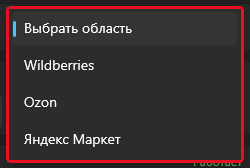
You choose the profile in the first-run wizard and can change it later on the “Профиль” (Profile) card in the main window. “Своя область” is called “Выбрать область” here -
Choose the printer and do a test print
In the “Принтер” (Printer) card, choose your label printer, not “Microsoft Print to PDF” or “OneNote”. Click “Пробная печать” (Test print): a label should come out with a large number 123 and the numberries.ru strip at the bottom. For details, see “Choosing and checking a printer”.
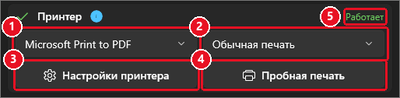
The “Принтер” card: printer selection, print mode and test print -
Set the label size
In the “Настройки этикетки” (Label settings) card, choose 30×20, 40×30, 40×40 or 58×40 mm, or enter your own size. In “Обычная печать” (Standard printing) mode, set the same size in the driver settings, with the media type set to “labels with gaps”. For details, see “Label settings”.
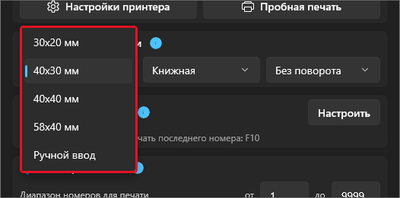
Preset sizes and a custom size -
Choose a print mode and start receiving
“Обычная печать” (Standard printing) works with any printer through the Windows driver, and “Быстрая” (Fast) works with printers that understand the TSPL language. Then receive items as usual: each scan prints one label, F10 reprints the last one, and F9 starts and stops work. The full step-by-step guide is in the Quick start; if something doesn’t print, see “Troubleshooting printing”.
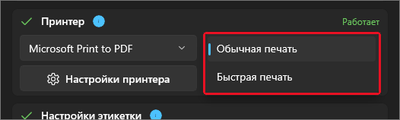
The “Обычная печать” and “Быстрая печать” modes
Common mistakes when buying and setting up
These are the mistakes that make the cell number print crooked, skip labels or not print at all. Many of them show up on the very first test print.
- Media too narrow for a 58 mm label. The XP-237B (media up to 48 mm), XP-243B (up to 56 mm) and ATOL DD120 (48 mm print width) won’t take it. Check the media width in the specs: 58×40 needs 58 mm or more.
- Semi-gloss labels in a thermal printer. They’re made for thermal transfer and come out blank in a direct thermal printer. Get ECO or TOP.
- No calibration. The printer skips every other label or prints across into the next one. Calibrate it after installation and whenever you switch to a new batch of labels.
- A large roll in the XP-365B. Rolls thicker than 80 mm don’t fit under the cover, and stores often don’t list the diameter — check before buying. If you need a large roll, look at models that take 100–127 mm rolls.
- Bluetooth instead of USB at a fixed station. Extra setup and the risk of losing the connection at rush hour.
- A cold storage area. The XP-365B and XP-370B work from +5 °C, and the TSC TDP-225 from +5 to +40 °C.
- No spare printer. The XP-365B print head isn’t replaced under warranty, and repairs take time. For a pickup point network, keep a spare.
- The wrong printer is selected in the app. “Microsoft Print to PDF”, “OneNote” and “Fax” don’t print on paper. Choose your label printer in the “Принтер” (Printer) card.
- The size in the driver doesn’t match the size in the app. In “Обычная печать” (Standard printing) mode, the number comes out small or cut off. Set the same size in the printer settings.
- A label over the barcode or marking code (KIZ). They’re scanned at handover and on returns. Stick the number on a clear area of the packaging.
Questions and answers
Does an Ozon pickup point need a printer?
We found no public printer requirements from Ozon. But an Ozon pickup point does have to print: container and crate labels, with the printer button in Ozon Turbo (Ozon Универ ПВЗ, Feb 10, 2026), and, for some items with an unreadable barcode, a label from the “Показать этикетку” (Show label) button, which is printed, cut out and attached to the item (Jan 23, 2026). Ozon doesn’t specify the printer model or format. A thermal printer for cell numbers is optional: Ozon asks staff not to write the cell number on items and recommends a sticky note, a price tag or masking tape (Jan 22, 2026).
Does a Wildberries pickup point need a printer?
WB’s checklist for opening a pickup point on standard terms doesn’t include a printer (version of Aug 25, 2026). WB ПВЗ generates cell QR labels as a PDF — up to 33 per A4 sheet, printed on a regular printer. A thermal printer is needed to print the cell number on a label: WB banned markers for work with items on April 2, 2024.
Which thermal printer should I buy for a pickup point?
For cell numbers, a 3-inch direct thermal printer with USB and 203 dpi is usually enough, such as the Xprinter XP-365B (4,970 ₽) or the similar POScenter PC-365 (5,900 ₽), prices as of Sep 24, 2026. For item-by-item receiving, a peeler like the one on the XP-370B is handy. For details, see the model comparison.
What label size do I need for the cell number?
Popular sizes are 40×30 and 58×40 mm: on a rectangular label, the number is larger and visible from a distance. Numberries has presets for 30×20, 40×30, 40×40 and 58×40 mm, and you can enter any other size manually. For 58 mm, you need a printer that takes media 58 mm wide or more: the XP-237B, XP-243B and ATOL DD120 won’t take it.
Can I print cell numbers on a regular printer?
Technically, yes: Numberries prints to any printer that prints from Windows. But an office printer uses a separate sheet for each label, so pickup points get a thermal label printer for numbers on items. A regular A4 printer is useful at a pickup point for WB cell QR labels and Yandex Market handover certificates.
How are pickup point labels different from a cell number label?
The 75×120, 100×150 and 58×40 mm barcode labels are printed by the seller, who uses them to label goods and shipments. An Ozon pickup point sometimes has to print a container label or a label for an item with an unreadable barcode from Ozon Turbo. A cell number label is for the pickup point itself, to sort and find orders. A Numberries label has a large number and the numberries.ru strip at the bottom, with no barcode.
Why does the printer print blank labels?
Most often, the labels have no thermal layer: scratch a label with something sharp or with a fingernail, and a black line should appear. Other causes: the roll is loaded the wrong way around, the labels are semi-gloss (they’re for thermal transfer printers with an ink ribbon), or the print head is dirty.
Why does the printer skip every other label?
The printer can’t detect the edge of the label, so the sensor needs calibrating. According to the Xprinter FAQ, their printers, except 2-inch models, calibrate automatically at power-on; to calibrate the 300 series manually, turn the printer off, hold down PAUSE and turn it on. If you print from Numberries in “Обычная печать” (Standard printing) mode, set the same size and the “labels with gaps” media type in the driver settings. For details, see the “Troubleshooting printing” article.
How much does one label cost?
About 6 kopecks for a 30×20 mm label and about 24 kopecks for 58×40 mm (ECO, retail prices as of Sep 24, 2026). Per 1,000 items received, that’s 60 ₽ to 243 ₽, depending on the size. We didn’t collect prices for 40×30.
Can I stick the number label on the barcode?
Better not. The barcode, QR code and marking code are scanned at handover and on returns, and a label on top of them gets in the way. Stick the number on a clear area of the packaging.
Do I need a separate scanner to print numbers?
No, you don’t need to buy a separate scanner: the one you already use to receive items on this computer will do. Receiving on a smartphone won’t work: Numberries runs only on Windows.
What computer does a pickup point need?
An ordinary computer with Windows 10 (version 2004 or later) or Windows 11. The Numberries documentation has no memory or screen requirements; our guideline is at least 4 GB of RAM. For the Wildberries profile, the WB ПВЗ app (formerly WB Point) must run on the same computer; for Ozon and Yandex Market, you need Google Chrome, Microsoft Edge, or Yandex Browser. For details, see “Computer for a pickup point”.
Sources
Marketplaces
- Wildberries: checklist for opening a pickup point on standard terms, version of Aug 25, 2026; pvz.wb.ru, Sep 24, 2026.
- WB ПВЗ channel on Telegram: Apr 2, 2024, Aug 13, 2025, Sep 30, 2025, Jan 23, 2026.
- WB Offer for pickup points, revision 155: point-quality.wb.ru.
- Ozon Универ ПВЗ on Telegram: Jan 31, 2024, Jan 22, 2026, Jan 23, 2026, Feb 10, 2026, May 14, 2026.
- Yandex Market: pickup point equipment, Sep 24, 2026.
Manufacturers and stores
- Xprinter: catalog and FAQ; TSC: TDP-225 spec sheet; MERTECH.
- Prices as of Sep 24, 2026: Регард, Магазин 1С, Интер Ай Ди, Гофросклад.
Media and other sources
- МТС Медиа, Jun 23, 2026; Модульбанк, Jun 30, 2023; Oborot.ru, Aug 1, 2024.
- Time and marker use estimates: PrintSlot blog, May 6, 2026; XP-365B reviews: Отзовик.
Numberries is independent software and isn’t affiliated with or endorsed by Wildberries, Ozon or Yandex. Marketplace and printer names are trademarks of their respective owners. We don’t sell printers or labels: specs come from manufacturers and store listings, and prices from public catalogs as of the check date. Don’t stick the number label over a barcode or marking code, and check the marketplace’s rules on labels bearing numberries.ru yourself.